
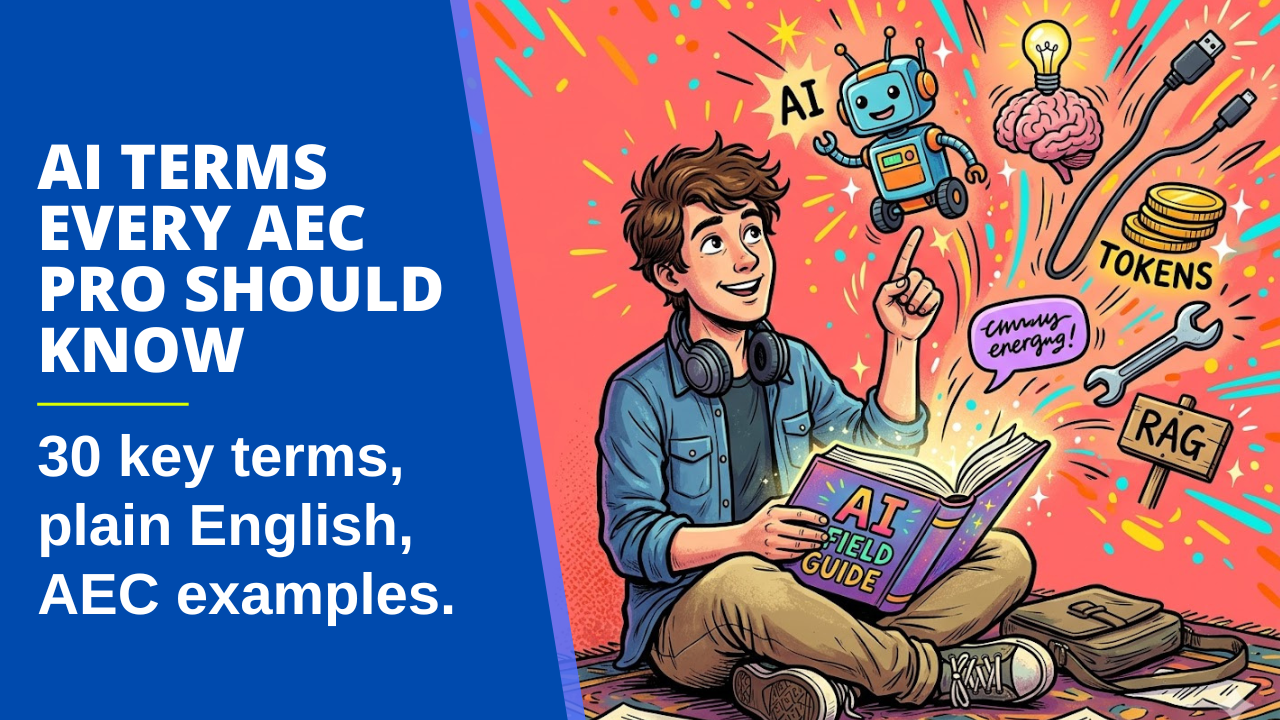
Your IT director sends a memo about AI governance. A vendor demo refers to an “agentic workflow.” A colleague forwards an article about shadow AI. The terms keep multiplying, and pretending you know them is starting to wear thin.
If you’ve been following along in meetings without quite knowing what half of this means, you’re not alone. AI vocabulary is a fast-moving target. A year ago, nobody in AEC said “agent.” Now you can’t sit through a software demo without hearing it three times.
This post is a cheat sheet you can bookmark. Each term gets a definition, an AEC-specific example, and a quick note on why it matters. The list is split into five sections. Read it straight through, or jump to whatever’s confusing you right now.
The Foundation: How AI Actually Works
These terms are the building blocks. All the other terms either describe one of these, control one, or extend what one can do.
LLM (Large Language Model)
A type of AI trained on huge amounts of text in order to predict the next word in a sequence. ChatGPT, Claude, and Gemini are all LLMs.
Example: When you paste a section of a spec into Claude and ask for a summary, the LLM is what’s reading the spec and responding to you.
Why it matters: Almost every AI tool you’ll touch in AEC is built on top of an LLM. Knowing what one is and isn’t keeps you from over-trusting the output.
Token
The unit that an LLM uses to count text. One token is roughly four characters in English, so an individual token is often a short word or a piece of a longer word. Both your input and the AI’s response count toward the total number of tokens.
Example: A 50-page PDF spec might be around 25,000 tokens. Upload three of those, and you’ve eaten a noticeable chunk of your daily limit before asking a single question.
Why it matters: Tokens are the unit behind two different things people often confuse: how much you can do on a paid plan, and how much the AI can hold in mind at once. The next two terms break those apart.
Context window
The total amount of text an LLM can hold in mind at once during a single conversation, measured in tokens. This includes your messages, any uploaded files, additional instructions, and any results from connected tools.
Example: Claude can hold around 200,000 tokens in context, enough for a small book or a stack of project specs. ChatGPT’s free tier holds far less.
Why it matters: When you “lose” something in a long conversation, you’ve fallen out of the context window. This is separate from your monthly usage limit. One is working memory, the other is your spending budget.
Context rot
The gradual decline in AI output quality as a conversation gets longer and the context window fills with old messages, irrelevant files, and stale tool results.
Example: You start a chat with a sharp and focused prompt. Forty exchanges in, after uploading three PDFs and pulling data from connectors, the responses get weird and start ignoring earlier instructions.
Why it matters: Most “the AI is getting dumber” complaints stem from context rot. The fix is almost always to start a new conversation, not to write a better prompt. Ask your LLM to summarize the conversation into a prompt you can use in a new chat. This works wonders.
Prompt
The instructions and information you give to an AI in a chat.
Example: “Write a 200-word executive summary of this design narrative for the client” is a prompt. So is the design narrative you paste in below it.
Why it matters: The prompt is the only thing you control, so it’s worth getting good at. Keep in mind that you don’t have to get everything right in your initial prompt. Ask the LLM to suggest details you’re missing.
Prompt engineering
The practice of writing prompts that produce useful, reliable results.
Example: Adding “Use only the information in the provided document. If something isn’t covered, say so.” dramatically reduces made-up answers.
Why it matters: Most “the AI is bad at this” complaints are actually “my prompt is bad.” Not a criticism, just a fact about where the control lives.
Hallucination
When an LLM makes up information that sounds plausible but isn’t true.
Example: Asking Claude to “find the section in IBC 2021 about egress widths” might produce a confident answer with a fake section number. The number sounds real. It is not.
Why it matters: The AEC industry has zero tolerance for fabricated dimensions or imaginary code references. Always verify anything specific the AI tells you about codes, standards, or product specs.
Guardrails
Constraints built into an AI system that prevent it from producing harmful, off-topic, or unreliable output.
Example: A custom GPT trained on your firm’s spec database can be set up to refuse questions outside of building specs, or to always cite the source document.
Why it matters: When vendors say their AI is “safe” or “enterprise-ready,” they’re mostly talking about guardrails. The strength of those guardrails is fair game to ask about.
Getting Things Done: How AI Takes Action
This is where AI stops being a chatbot and starts doing actual work in your software.
Tool
A function or capability that an AI can call to do something beyond text generation.
Example: Web search lets Claude look up current zoning amendments. Code execution lets it run a calculation. File reading lets it open a CSV of room data. Each one extends the AI's capabilities.
Why it matters: An AI without tools can only talk. An AI with tools can act. That’s the whole shift that’s happening right now.
Agent
An agent is an AI system that can act independently. It can plan, take multiple steps, and use tools to complete a task without you supervising every move.
Example: An agent that reviews a Revit model, identifies missing parameters, queries your project standards, flags issues, and writes a report. You give it the goal. It picks the steps and gets it done.
Why it matters: This is the term that's overused the most. A lot of “agents” are chatbots with a button. A real agent makes decisions and adapts. Ask what it does on its own before believing the label.
Agentic
The adjective form of “agent”. Describes a system or workflow that has agent-like behavior.
Example: An “agentic code review” tool doesn’t just flag errors. It investigates, runs tests, and proposes fixes.
Why it matters: When you see “agentic” in marketing copy, ask what the system is actually doing on its own. Sometimes the answer is “not much.”
Workflow
A defined sequence of steps that accomplishes a task. In an AI context, a workflow is often a series of prompts, tools, and decisions chained together.
Example: A workflow that takes a meeting transcript, summarizes it, drafts an email to the client, and creates follow-up tasks in your project management tool.
Why it matters: Workflows are how you turn one-off prompting into repeatable infrastructure. This is where most of the actual time savings happen.
MCP (Model Context Protocol)
An open standard for connecting AI models to external tools, data sources, and applications.
Example: An MCP server that connects Claude to Revit so you can ask Claude to query the model, list parameters, or generate views just by chatting.
Why it matters: MCP is the closest thing AI has to a common standard, like USB-C cables. Before MCP, every integration was custom. Now there’s a shared protocol, which is why integrations are getting much faster to build.
API (Application Programming Interface)
A defined way for code to interact with something else. There are two types of APIs that matter for AEC. First, an API can let two separate pieces of software communicate over a network, such as sending data from Procore to a custom Power BI dashboard. Second, an API can let you write code that runs within an existing application to extend or automate it, such as building a Revit add-in.
Example: The Revit API is what every Revit add-in, including Dynamo, is built on. The Anthropic API is what lets you build Claude directly into your own tools or workflows.
Why it matters: APIs predate AI by decades. But they're the underlying machinery for almost every AI integration you'll touch.
Where AI Gets Its Knowledge
This is the grounding layer of all things AI. Most the AI got it wrong” complaints trace back to misunderstandings here.
Training data
The text, code, and other content on which an LLM was trained.
Example: Claude has read a lot of public AEC content, including building codes, manufacturer documentation, and Revit forum posts. It has not read your firm’s private project files.
Why it matters: Training data sets the floor of what the model knows by default. Anything beyond that has to come from your prompt or from RAG (see below).
Knowledge cutoff
The date after which the AI has no training data.
Example: As of May 2026, Claude’s knowledge currently ends in January 2026. Ask about a code amendment passed in March of 2026 and it won’t know unless it can search the web.
Why it matters: Always assume the model is out of date on anything time-sensitive.
RAG (Retrieval-Augmented Generation)
A technique that fetches relevant chunks of documents from a database and passes them to the LLM along with your question. RAG reduces prompt size by retrieving only the relevant material instead of the full source documents.
Example: A tool that searches your firm's archive of past specs, pulls the three most relevant sections, and gives them to Claude before answering your question.
Why it matters: RAG is how you get an AI to "know" your firm's content without retraining the model. Most useful AEC AI products use RAG under the hood.
Fine-tuning
Further training a base model on a specific dataset to specialize its behavior.
Example: Fine-tuning Claude on your firm’s report library to improve its quality and formatting on similar documents.
Why it matters: You probably don’t need this. RAG handles most of what people think of as fine-tuning, at lower cost and with greater flexibility. If a vendor pitches fine-tuning, ask why RAG won’t do.
Daily-Use Concepts
These are things that appear in your actual workflow and help you make better choices about which tool to use when.
Multimodal
An AI that can process more than one type of input. Most often text, images, audio, and sometimes video.
Example: Uploading a photo of a hand sketch and asking Claude to describe the layout in text, or generate Revit-ready geometry from it.
Why it matters: Multimodal capability is what makes AI useful for design work, where much of the information lives in drawings rather than text.
Reasoning model
A model that takes time to “think” through a problem step by step before answering.
Example: A standard chat model is fast and good for quick writing or simple questions. A reasoning model is slower but better suited to problems that benefit from logical reasoning, like checking a code calculation or debugging a complex script.
Why it matters: Use the wrong type and you’ll either burn time waiting on simple questions or get fast, bad answers to hard ones. Most platforms now let you pick.
System prompt
A set of instructions that defines the AI’s role, behavior, and constraints. Set once, applied to every conversation.
Example: A Claude Project for your firm with a system prompt that reads “Always use ASCE 7-22 references. Cite specific sections. Refuse to answer questions outside of structural design.”
Why it matters: System prompts are how you make a generic chatbot behave like a specialist tool. This is where Custom Instructions in ChatGPT and Personal Preferences in Claude live. Claude also lets you set Project Instructions for each Project, which is a more specific type of system prompt.
Artifact
A file, diagram, or piece of content the AI produces that lives outside the chat thread. Artifacts can be downloaded or shared. ChatGPT calls its version Canvas.
Example: Asking Claude to write a project narrative and getting back a Word document you can open, edit, and send to a client without copying text out of the chat window.
Why it matters: Artifacts are how AI output goes from “interesting reply” to “actual deliverable.” For AEC pros, this is the bridge between chat and real work product.
Markdown
A lightweight text format that uses simple symbols for headings, bullets, and bold. Files end in .md.
AEC example: Claude outputs Markdown by default. The asterisks for bold and pound signs for headings you see in responses are Markdown syntax. Here is an example of Markdown:
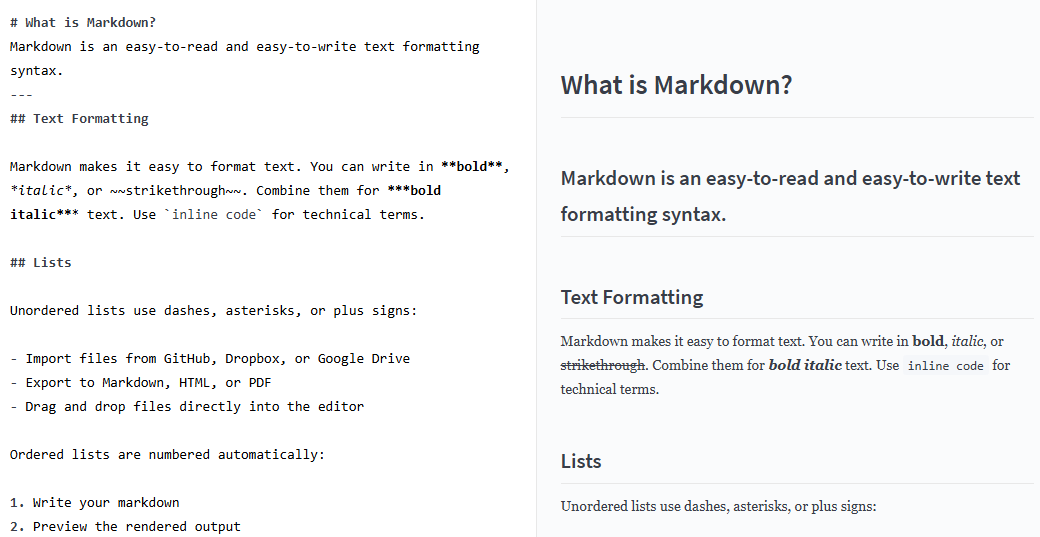
Why it matters: Markdown is the lingua franca of AI input and output. PDFs and Word docs work, but they carry hidden formatting that bloats the context window. Plain text instructions in a .md file are leaner and more reliable.
JSON
A structured data format that AI tools use to pass information cleanly between systems. Stands for JavaScript Object Notation, but you don't need to know that.
AEC example: A workflow that takes a Revit family description from Claude and outputs JSON, which a separate script reads to actually build the family in Revit. Here is a sample JSON file:
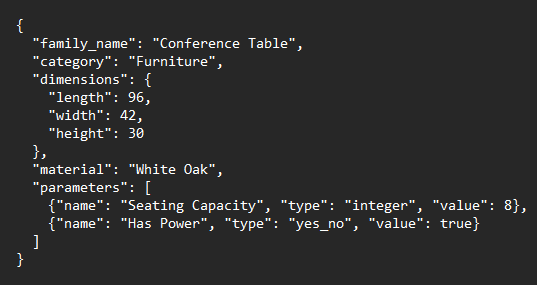
Why it matters: When you build AI tools that talk to other software, JSON is almost always the handoff format. You don't need to write JSON by hand, but recognizing it stops you from being thrown when an AI tool produces it.
Skills
A packaged set of instructions and reference files that teach an AI how to do a specific task consistently.
AEC example: A skill that knows how to write your firm's weekly client status emails in your voice, using your formatting, with the right level of detail. Once built, you trigger it by name and the AI follows the instructions every time.
Why it matters: Skills are how individual AEC pros are starting to build firm-specific AI capability without writing code. Different from a system prompt because skills are modular and reusable across projects.
Vibe coding
Creating software by describing what you want to an LLM in plain language and letting it generate all the code.
Example: Telling Claude, “write a Revit script that renames all sheets to the format DRAWING-LEVEL-NUMBER”. Claude generates all the working C# or Python code for you.
Why it matters: This isn’t a substitute for understanding code, but it lowers the barrier to automating things that used to require a developer. AEC professionals writing their own tools and plug-ins is now a real thing.
Firm and Policy Terms
This is less about how AI works and more about how your firm will manage it. The last one is the most important, and the least talked about.
Governance
The framework of policies, processes, and oversight that a firm uses to manage AI use.
Example: A document that says which tools employees can use, what data can be uploaded, who reviews AI-generated deliverables, and how usage is tracked.
Why it matters: If your firm doesn’t have AI governance yet, it will. The conversation is moving from IT to risk to legal to leadership.
AI policy
A specific written document, usually a subset of governance, that tells employees what’s allowed.
Example: A two-page policy that says “ChatGPT is approved for internal use for communications. Do not paste client information, billable rates, or proprietary project details into any public AI tool.”
Why it matters: A clear policy protects the employees who want to use AI productively and the firm from accidental data exposure.
Responsible AI
A loose umbrella term for principles around fairness, transparency, accuracy, and accountability in AI use.
Example: Disclosing to a client that AI was used in producing a deliverable. Or reviewing AI-generated content for bias before it goes out.
Why it matters: This term is fuzzy. When someone uses it, ask what specifically they mean. The answer reveals whether they’re serious or signaling.
Shadow AI
Employees are using AI tools without IT or leadership approval or knowledge.
Example: A project architect pasting project specs into a personal ChatGPT account to draft an RFI response. The work gets done. Nobody reviewed whether that data should have been released to a third party.
Why it matters: Shadow AI is happening in every firm right now, including yours. Ignoring it is its own form of risk. Better to have a policy and an approved toolset than pretend it isn’t happening.
A Final Note
This vocabulary will keep changing. Six months from now, there will be many new terms, and some of these current ones will sound dated. The point isn’t to memorize the list. It’s to know enough to follow a conversation, ask sharper questions, and not nod along when something doesn’t make sense.
The terms that matter most are the ones tied to actual practice. Knowing what RAG is matters less than understanding why your firm’s AI tools need access to your spec library. Understanding “agent” matters less than seeing what an agent actually does in your workflow.
If you want to take any of these from definition to daily use, that’s what the Claude Workflows for Architects course is for. We spend eight weeks turning the vocabulary into systems you run yourself.
Get the Thursday Top 5
My weekly email with five interesting and useful links on BIM, design, and technology, plus a few laughs along the way. I send it every Thursday. Join the over 8,000 AEC professionals who already get it.
