
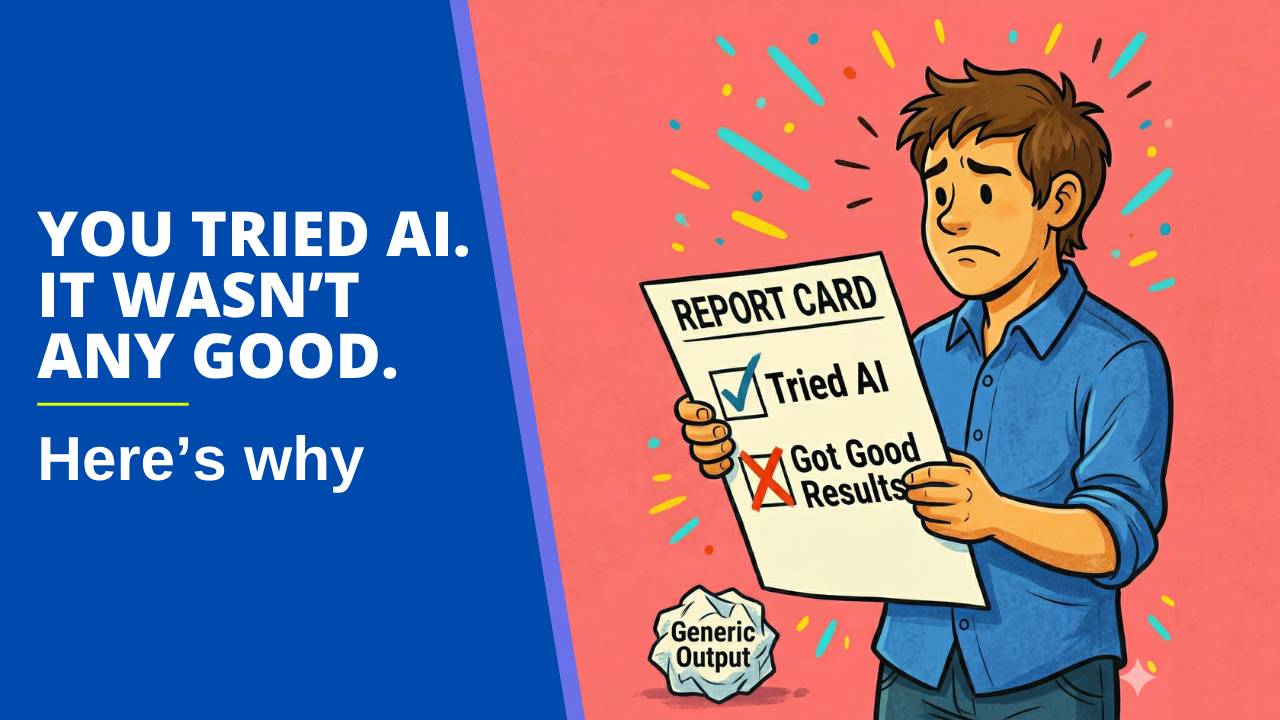
Before I ran my Claude for Busy Architects workshop last week, I sent out a survey. I wanted to know where people actually were with AI, not where LinkedIn thought they were. 134 people responded. The results surprised me, but not in the way I expected.
The surprise wasn’t that people aren’t using AI. Most of them are. The surprise was what was stopping them from using it well.
You’re Already Using It. It’s Just Not Working.
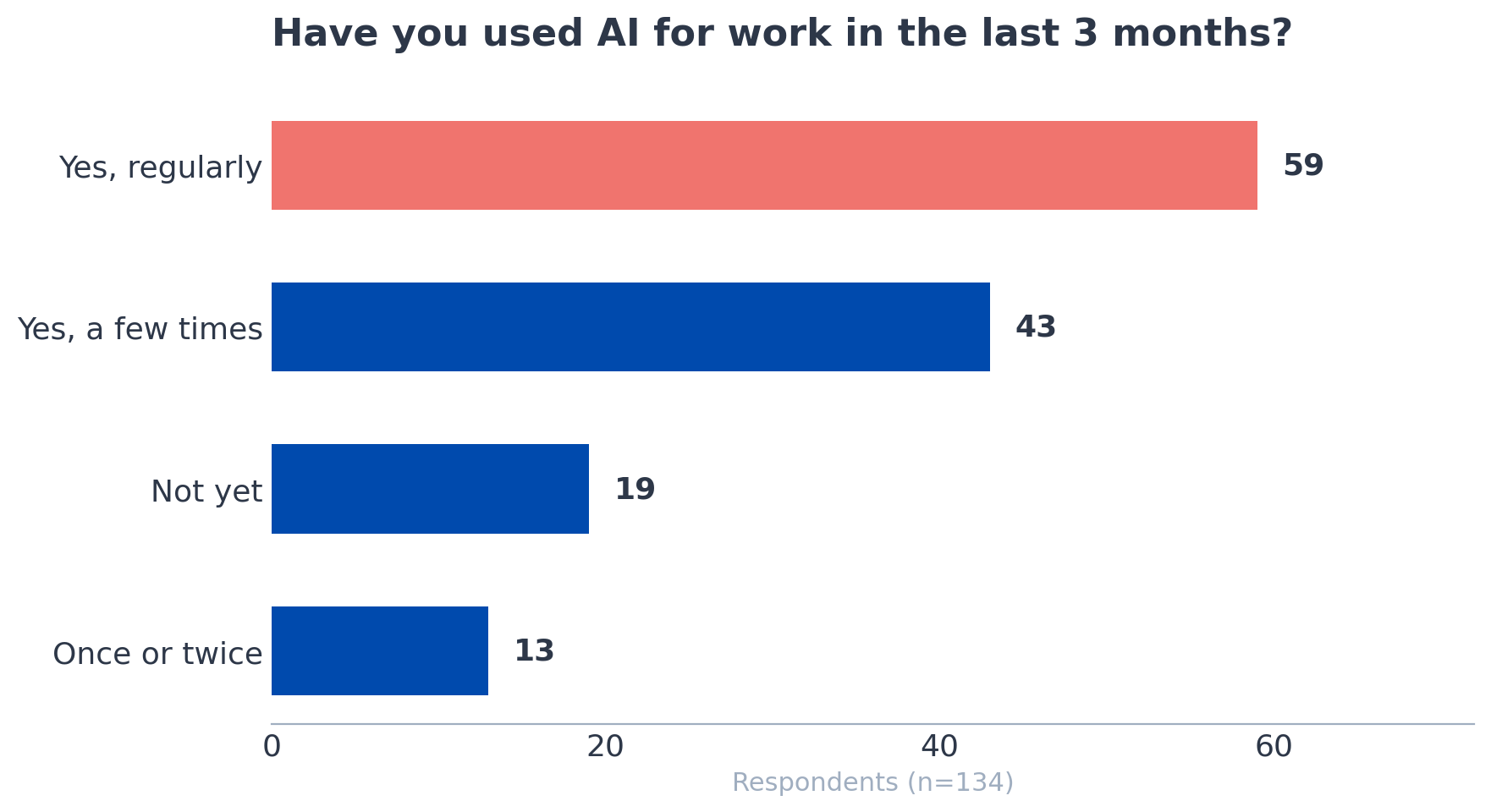
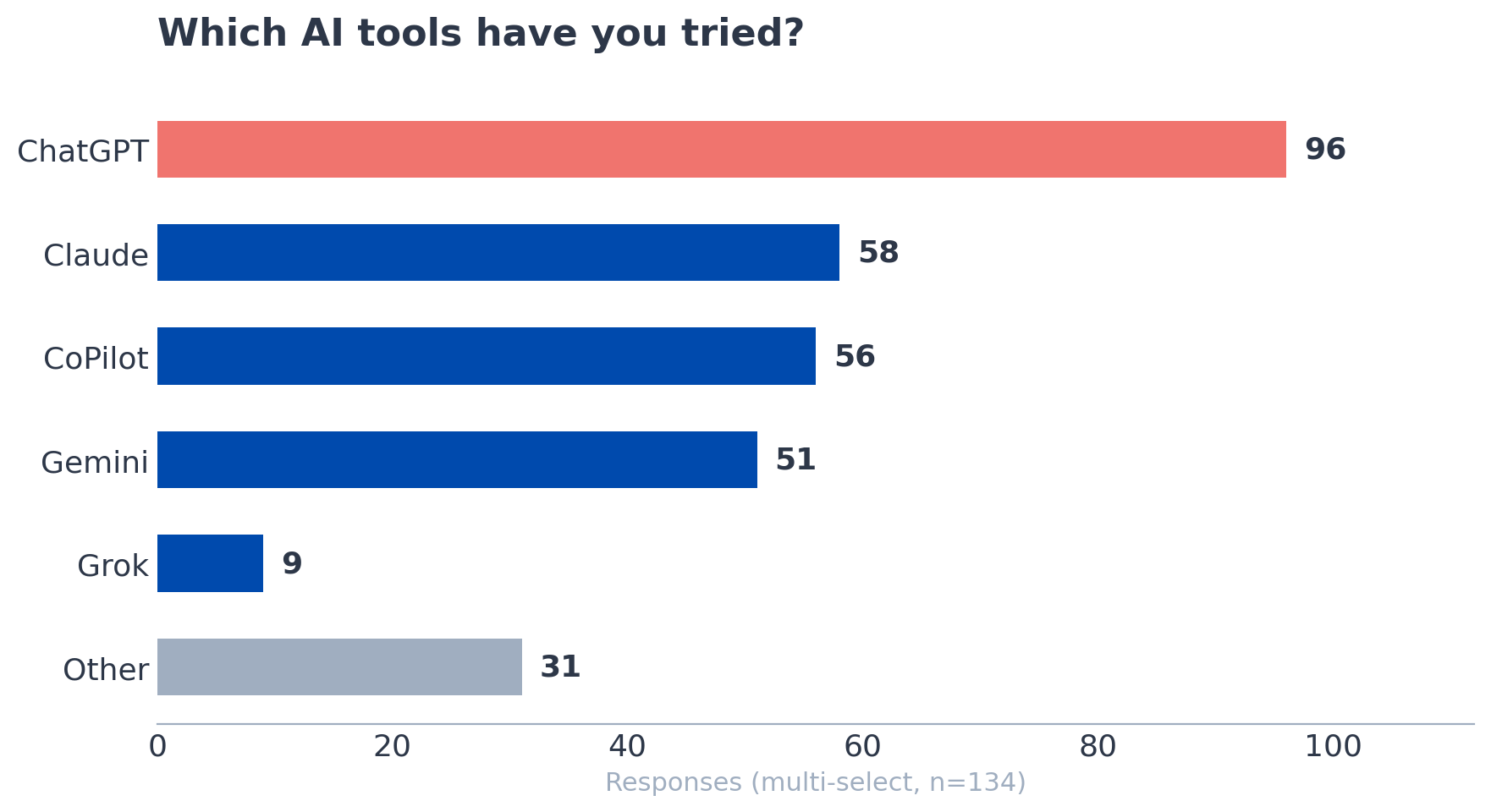
Of the 134 respondents, the vast majority had used AI at work in the last three months. A large portion uses it regularly. Only a handful said they hadn’t tried it at all. ChatGPT was the most common tool, followed by CoPilot (mostly through enterprise Microsoft setups), then Gemini, then Claude. Many people use two or three tools at once, switching between them depending on the task.
So the adoption question is basically settled. People are in. The real question is why they’re frustrated.
When I asked what’s stopping them from using AI more, two answers dominated: “I don’t have time to figure it out” and “I’ve tried it, and the output wasn’t good / felt too generic.” Those two responses kept showing up, often selected by the same person.
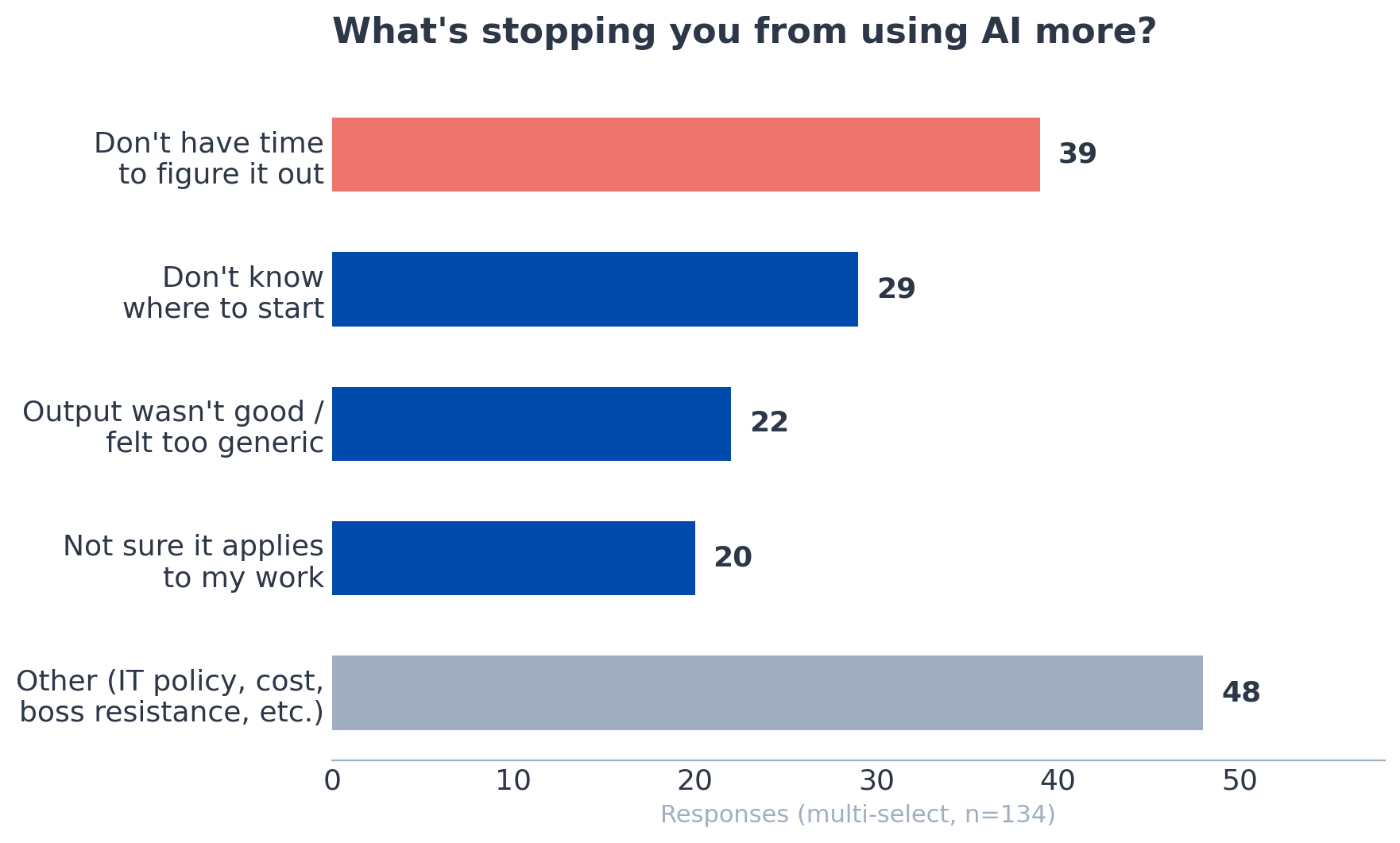
The open-ended responses told an even sharper story. One person wrote that results need to be right, and they still have to click through every reference to verify accuracy. Another said they’re not confident in the output and need company-wide processes before they can scale it. Someone on DOD contracts pointed out that they can’t use Claude at all and asked which alternatives are worth paying for. Several mentioned resistant bosses, IT policy restrictions, and data privacy concerns as blockers that sit above any individual skill gap.
The picture that emerged was that most AEC professionals have tried AI, found it underwhelming or unreliable, and either don’t have the time or the organizational support to push through that initial disappointment.
The Output Problem Is a Prompting Problem
Here’s what I’ve learned from using Claude heavily for the last two years: most people talk to AI the way they’d type into a search engine. Short queries, no context, no constraints. Then they’re surprised when the output reads like a Wikipedia summary with extra confidence.
During the workshop, I showed how setting up custom instructions can completely change the output. Things like telling Claude to ask clarifying questions before responding, to check its own work against your specifications, and to flag when your assumptions are wrong. These aren’t advanced techniques. They take about five minutes to set up. But they shift the interaction from “generic chatbot” to something closer to working with a knowledgeable junior colleague who knows you and your standards.
One workshop attendee shared a useful tip in the chat: once you get a result you like, ask the AI to write a prompt that would reproduce that result in the future. That’s the kind of compounding move that turns a one-off win into a repeatable workflow.
There’s another factor I suspect is at play. I didn’t ask whether people were using free or paid plans, but based on the responses, I’d bet most are on free tiers. That matters more than people realize. Free plans use older, less capable models, impose tighter usage limits, and in many cases train on your data as the implicit cost of entry. The jump in quality from a free plan to a paid one is significant. If your impression of AI is based entirely on the free version of ChatGPT, you’re evaluating a tool you haven’t actually seen yet.
The survey data backs this up more broadly. People who described themselves as regular users and were still frustrated almost always pointed to output quality, not the tool itself. They’ve got the habit. What’s missing is the technique, and possibly the right tier of the tool.
The Use Cases Architects Actually Care About
The most interesting part of the workshop wasn’t the demos I planned. It was the audience's unprompted questions that came in.
Three separate attendees, without any coordination, asked about using AI for building code review. One wanted to know if Claude could identify local amendments and how it compared to UpCodes. Another asked whether it could search a building department website to surface local interpretations and determine which regulation actually applies. A third asked about creating a reusable “Code Review” skill so they wouldn’t have to teach the same jurisdiction’s rules every time.
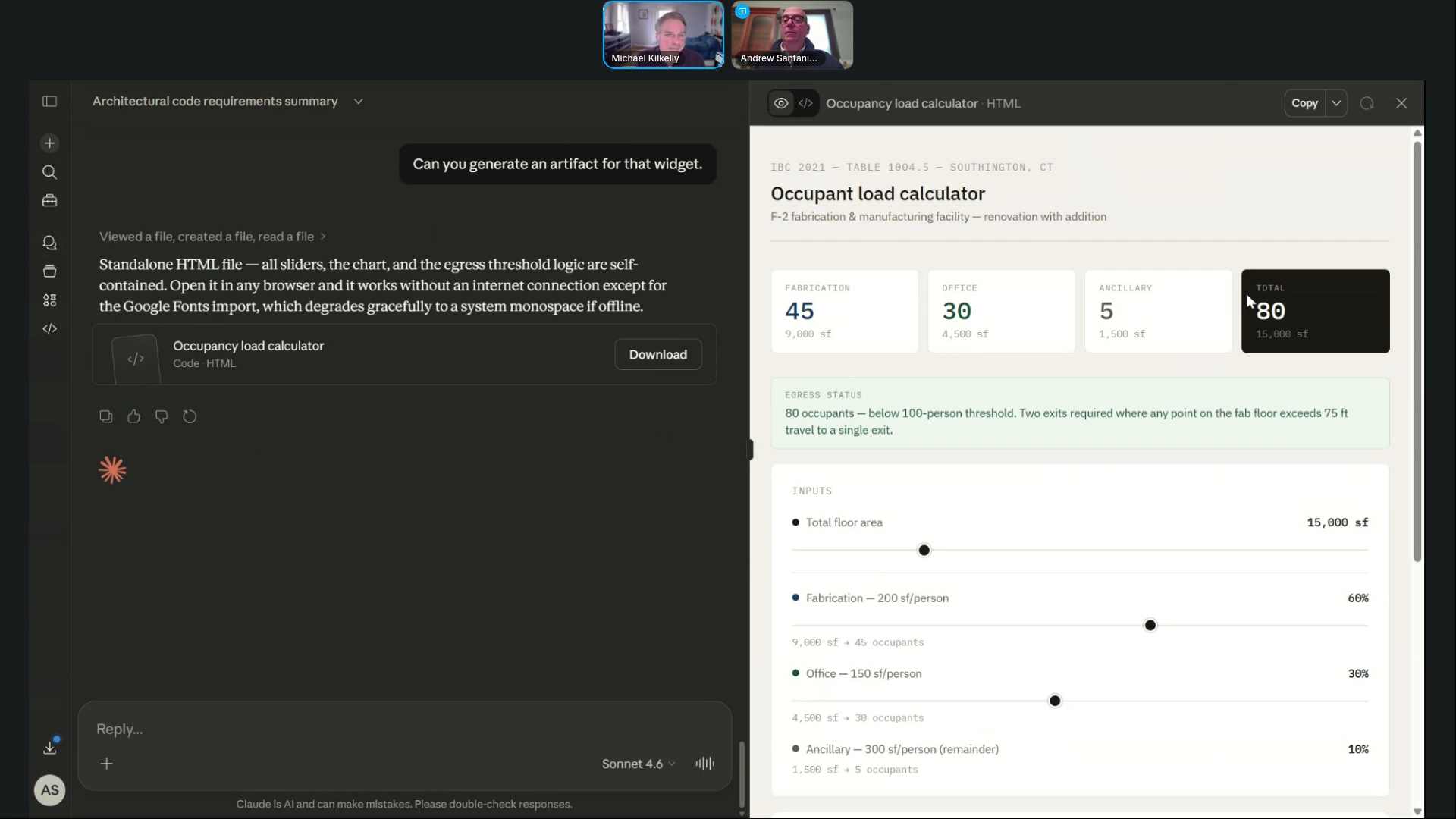
That’s three people arriving at the same use case independently. Code compliance is tedious, high-stakes, and jurisdiction-specific. It’s exactly the kind of work where AI can save real time if you set it up correctly.
Submittals came up, too. One attendee asked if Claude could catch handwritten notes on submittals. Another pointed out, with a grimace you could feel through the chat, that contractors will use these same tools to generate RFIs and potential change orders. That comment got the most upvotes of anything in the entire Q&A. The defensive use case for AI in construction documentation is already on people’s minds.
If You Tried It Six Months Ago, Try Again
My friend Andrew Santaniello joined me for the workshop. He’s been a practicing architect for 30 years. He uses AI daily for writing, RFP responses, and research. But he’d never touched Claude before the workshop. He literally signed up for it that day.
I mention this because I think it’s representative of where many experienced architects are. They’re using some AI, mostly the tools that come bundled with their existing software. But the standalone LLMs, the ones with the deeper capabilities, haven’t made it into the workflow yet.
The tools have changed meaningfully in the last three to six months. Features that didn’t exist or barely worked a year ago, things like uploading project documents, creating interactive outputs, and building reusable custom workflows, are now reliable enough to use on real projects. If your last experience with AI was a disappointing ChatGPT conversation in 2024, you’re working with outdated information.
What’s Next
The survey told me that the gap isn’t awareness. It’s technique, time, and trust. Most AEC professionals know AI exists and have tried it. What they need is a structured way to get from “I played with it once” to “this is part of how I work.”
That’s why I built the Claude Workflows for Architects course. It’s designed for practicing professionals who don’t have time to experiment aimlessly but can see that the tools have gotten good enough to take seriously. If you recognized yourself anywhere in the survey data above, the course is the fastest way to close that gap.
If you want to see the demos and audience Q&A that sparked this post, you can watch the full workshop recording here.
Get the Thursday Top 5
My weekly email with five interesting and useful links on BIM, design, and technology, plus a few laughs along the way. I send it every Thursday. Join the over 8,000 AEC professionals who already get it.
